Melya: A Handwritten Font for Business
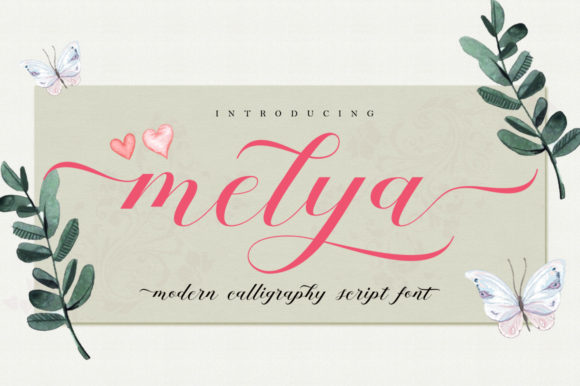
As a small business owner, I know how important it is to create a brand that feels consistent, professional, and approachable. One of the simplest yet most powerful tools I’ve found is Melya, a cute, yet elegant handwritten font with an undeniable charm. It’s the kind of typeface that adds a personal touch without being too casual or unprofessional.
When I first discovered Melya, I was looking for a way to make my branding feel more authentic. My business focuses on handmade products, and I wanted a font that reflected that craftsmanship. Melya fit perfectly—its soft curves and gentle strokes give off a warm, friendly vibe that resonates with customers who value quality and care in their purchases.
What Makes Melya Unique?
Melya has a distinct personality. It’s not just a script font—it’s a style that feels like it was written by hand, giving your designs a human, genuine feel. The font has a light and authentic touch, making it ideal for businesses that want to communicate warmth and creativity without being overly stylized.
Its versatility is another big plus. Whether you’re designing a logo, creating social media graphics, or working on packaging, Melya adapts well to different formats. It’s especially effective when used as a headline or accent font, where its elegance can shine through without overwhelming the design.
Real-World Applications for Melya
I’ve used Melya in several areas of my business, and it never disappoints. For example, on my product labels, it adds a subtle sophistication that makes each item feel special. When I created my website banners, Melya helped me stand out while maintaining a clean, modern look.
Another area where Melya has made a difference is in my social media content. I use it for Instagram posts and Pinterest graphics, where its handwritten style catches the eye and feels more engaging than a standard sans serif font. It also works well for digital ads, helping to draw attention without feeling too flashy.
For my business cards, Melya gives a sense of personality that aligns with my brand’s values. It’s not too formal, but it still looks professional. I’ve also used it for thank-you cards and stickers, which are small touches that make a big impact on customer experience.
When to Use Melya
Understanding when to use Melya is key to getting the most out of it. As a display font, it excels in headlines, logos, and titles where visual appeal matters most. However, it’s not always the best choice for body text. That’s where font pairing comes into play.
Pairing Melya with a clean sans serif font, like Helvetica or Arial, creates a balanced look that’s both stylish and readable. If I’m designing a menu or flyer, I’ll often use Melya for the headings and a simple serif font for the body copy. This combination keeps the design cohesive while ensuring that the message is clear and easy to read.
For digital projects, such as website banners or email newsletters, Melya works well as an accent font. It adds character without making the design feel cluttered. On mobile screens, it remains legible as long as it’s used in larger sizes and paired with a contrasting background.
Testing Melya Before Branding
Before committing to Melya for your entire brand, I recommend testing it in different contexts. Try using it on a few sample designs—business cards, social media posts, and packaging mockups—to see how it performs in real-world scenarios.
Also, pay attention to how it looks in print versus on screen. Some fonts can appear different depending on the medium, so it’s important to check both. If you’re unsure, consider using a free font viewer or software to preview how Melya will look in various sizes and colors.
Font Pairing Tips
One of the best ways to use Melya effectively is to pair it with other fonts that complement its style. For example, if you’re using Melya for a logo, pairing it with a modern sans serif font helps balance its decorative elements with a clean, professional look.
If you’re designing a website or marketing material, consider pairing Melya with a serif font like Georgia or Times New Roman. This combination adds depth and contrast while keeping the overall design elegant and readable.
For a more contemporary feel, try pairing Melya with a geometric sans serif like Futura or Montserrat. This pairing works well for brands that want to blend traditional charm with a modern aesthetic.
Commercial Licensing Considerations
Finally, don’t forget about commercial font licensing. If you’re using Melya for products, packaging, templates, or client work, make sure you have the proper license. Many fonts, including Melya, require a commercial license for business use, so it’s important to check the terms before you start designing.
By using Melya responsibly and thoughtfully, you can elevate your brand’s visual identity while maintaining professionalism and consistency across all touchpoints.