Lemon Brush: A Handwritten Font for Creative Web Design
As a web designer, I’m always on the lookout for fonts that bring personality to digital projects without sacrificing clarity. Lemon Brush is one of those rare finds—a handwritten script that feels both modern and authentic. It’s the kind of font that can elevate a simple header into something memorable, making it perfect for creative websites, brand identities, and digital campaigns.
First Impressions: A Fresh Take on Script Typography
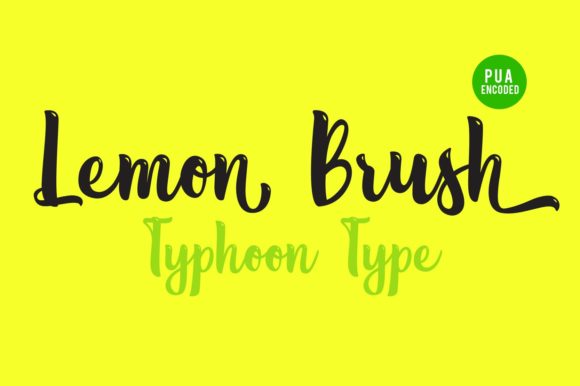
I first tested Lemon Brush while working on a boutique online store’s homepage. The font has a soft, flowing style with subtle flourishes that give it a handcrafted feel. It doesn’t look like a typical cursive—it has its own unique rhythm, which makes it stand out in a sea of generic script fonts. The contrast between thick and thin strokes adds visual interest, and the overall shape feels approachable and friendly.
What I appreciate most is how Lemon Brush balances creativity with readability. It’s not overly ornate, so it works well in digital environments where clarity matters. Whether used in a hero section or as a CTA button, it maintains a clean presence without overwhelming the design.
Real-World Use: From Headers to Call-to-Action Buttons
One of the first places I applied Lemon Brush was in a hero section for a coaching website. The headline stood out against a minimalist background, drawing attention without being too flashy. It paired beautifully with a clean sans serif body font, creating a balanced visual hierarchy. The font felt natural in this context, adding warmth to the otherwise structured layout.
I also experimented with using Lemon Brush for call-to-action buttons. On mobile screens, the font remained legible even at smaller sizes, which is a big plus. It added a touch of elegance without compromising usability, making it ideal for landing pages or product sales sites.
Responsive Design: How Lemon Brush Behaves on Different Devices
Testing Lemon Brush on mobile devices showed that it scales well without losing its character. On a smartphone, the font maintained its fluidity, and the spacing between letters didn’t feel cramped. This makes it a good choice for responsive layouts where typography needs to adapt to different screen sizes.
When placed over image banners or dark backgrounds, Lemon Brush retained its readability. The contrast was just right—neither too bold nor too light. It worked equally well on light backgrounds, offering versatility for different design themes.
Font Pairing: Finding the Right Balance
While Lemon Brush shines on its own, it also pairs well with other fonts. For instance, pairing it with a simple sans serif like Open Sans or Montserrat creates a clean, modern look that’s great for professional websites. Using it alongside a serif font like Lora or Georgia can add a more editorial feel, ideal for blogs or portfolio sites.
For more dramatic effects, Lemon Brush can be used as a decorative accent. I’ve seen it work well in subheadings, logo text, or as a separator between sections. It’s not meant for long paragraphs, but as a display font, it brings a lot of visual flair without being distracting.
Considerations for Web Use: When to Use and When to Avoid
Lemon Brush is best suited for short phrases, headlines, and decorative elements. It’s not ideal for body text or dense content areas, as the intricate details can make it harder to read in large blocks. That said, when used sparingly, it can add a unique touch to any web project.
It also works well in digital ads, social media graphics, and promotional banners. The font’s personality helps grab attention, making it a strong choice for campaigns that need a human, handmade feel.
However, there are some limitations. In accessibility-heavy interfaces or small navigation menus, Lemon Brush may not be the best option. Its decorative nature can interfere with legibility, especially for users with visual impairments.
Final Thoughts: A Versatile Tool for Digital Creativity
Lemon Brush is a standout font for web designers looking to add a personal, artistic touch to their projects. It’s versatile enough to work in a variety of contexts, from headers and buttons to branding elements and digital ads. Its modern yet handmade aesthetic makes it a great fit for creative businesses, startups, and personal websites.
If you’re looking for a font that combines charm with functionality, Lemon Brush is definitely worth considering. Just remember to use it strategically and pair it with complementary typefaces to maintain balance and readability across your designs.